Run scripts straight from the command line, fold a program and the runtime into a single
native executable, or embed the VM in an application that needs scripting. Fiber-based
async/await on a compact bytecode VM written in C - with a 32-module standard library,
zero dependencies, and 46+ open-source add-on libraries.
Fiber-based concurrencyStatic analyzerFFI / C pluginsEmbeddable VMARM64 & x86_64 JITPackage managerWindows · Linux · MacOSPortable bytecodeNull safetyOptional typing
// A quick taste of Flarisimport { Https, Status, ContentType, CookieJar, Multipart } fromlibrary("Https", "1.0");
fn asyncfetchData(url:string):object {
varresp=awaitHttps.GetAsync(url);
returnJson.Parse(resp.body);
}
fn asyncMain() {
letdata=awaitfetchData("https://api.example.com/data");
Console.WriteLine("Received: ",Json.Stringify(data));
// Fibers run concurrently on the cooperative schedulerletjobs= [
fetchData("https://api.example.com/a"),
fetchData("https://api.example.com/b")
];
foreach (jin jobs) await j;
return0;
}
Why Flaris
Built for speed, designed for clarity
Flaris is a compact scripting language with a fast interpreter, an automatic JIT and
first-class support for asynchronous programs. It performs in the same territory as Lua
and QuickJS on many workloads, while offering familiar syntax, optional typing, portable
bytecode and direct access to native libraries.
Run scripts directly during development, package them with the runtime as a single
executable, or embed Flaris when an application needs scripting. The complete runtime is
about a megabyte and has no external dependencies.
⚡
Bytecode VM
Compiles .fls source to compact .flx bytecode. Execute pre-compiled files for fast cold-start - compile once, deploy anywhere.
🔀
Fiber Concurrency
Lightweight fibers with async/await and cooperative scheduling: no shared-memory threads, no data races, deterministic execution. Blocking I/O runs on a worker pool, and numeric kernels passed to ProcessCallback or ProcessEvent run on other CPU cores.
🔍
Static Analyzer
A multi-pass analyzer (10 passes) catches type errors, unused variables, unreachable code, and flow issues before runtime.
🔌
FFI / C Plugins
Load native shared libraries at runtime and call C functions directly. Wrap performance-critical code in a thin C layer with full access to the VM API.
📦
32 Stdlib Modules
JSON, Regex, Crypto, File I/O, Streams (TLS included), Collections, Reflection, and more - batteries included without external dependencies.
🛡️
Safe by Default
Unsafe features (FFI, raw memory, eval) require the explicit --unsafe flag. Any module import can be pinned to a SHA-256 fingerprint - if the bytecode doesn't match, the VM halts before execution. Production deployments stay locked down.
🌐
Cross-Platform Bytecode
Compile on macOS, run on Linux (ARM64 or x86-64) or Windows without recompiling. Portable .flx files run on any supported target.
🧩
Embeddable VM
Link libflaris into your C application, or load it as a WebAssembly module from JavaScript, and script your game, tool or server. Each script gets its own namespace, capabilities and budget, and nothing it does ends your process.
Fold your program and the runtime into one native executable with --embed - a Go-style single file to ship, ~1 MB total, no install on the target machine.
Borrows from JavaScript and C# - let/var, classes, lambdas, modules. Short adoption time from most modern languages.
🚀
JIT Compiler
On by default: every eligible function compiles to native ARM64 or x86-64 automatically - no annotations, nothing to switch on. Loop-heavy math and array work runs 4-7x faster than the interpreter, same source. --jit-disable turns it off; --check reports why any function stayed interpreted.
🐞
Built-in Debugger
Breakpoints, stepping and variable inspection - in VS Code or from a terminal with --debug. The VM speaks the Debug Adapter Protocol itself, so there is no adapter to install.
🪶
Low Memory Footprint
SLAB allocator, SSO strings (≤7 chars inline), and compact bytecode keep heap pressure minimal. The full VM, compiler, and standard library weigh in at about 1.5 MB - ideal for embedded targets and resource-constrained environments.
🏷️
Optional Typing
Annotate as much or as little as you want. The analyzer infers types where omitted and enforces them where declared. Unions are general (int|string, T|nil), typed arrays like [int] are checked, a nil test narrows a scalar for the code it guards, and a switch over an enum is checked for missing members.
📦
Package Manager
flarispm installs packages from any git repository - no central registry needed. Written in Flaris itself. One command to add, compile, and import a library.
Run any script with --prof and get a table of where the time went, by function and, with -g, by line - builtin and library time charged to the script function that called it. Sampled from a CPU timer, so it costs nothing until you ask for it. For a running service, the Profiler library and HttpServer's Server-Timing option answer the same question in production.
Code Examples
See Flaris in action
From classes to fibers, from HTTP to native FFI - a few patterns to get started.
classAnimal {
letname=""; // instance fields are declared in the class bodyfnConstructor(n:string) { this.name = n; }
fnSpeak() { Console.WriteLine(this.name, " makes a sound."); }
}
classDog:Animal {
fnConstructor(n:string) { super(n); }
fnSpeak() { Console.WriteLine(this.name, " barks."); }
}
fnMain() {
letd:instance=newDog("Rex");
d.Speak(); // Rex barks.return;
}
fn asyncfetch(id:int):int {
Fiber.Sleep(id *10);
return id * id;
}
fn asyncMain() {
// Spawn three fibers - they run cooperativelyleta:fiber=fetch(3);
letb:fiber=fetch(1);
letc:fiber=fetch(2);
// await collects each resultConsole.WriteLine(await a, await b, await c); // 914return;
}
// Tight numeric loops compile to native ARM64 or x86-64 at runtime.// The JIT is on by default - nothing to annotate, nothing to switch on:// flarisvm compute.fls // JIT active// flarisvm --jit-disable compute.fls // bytecode interpreter only// flarisvm --check compute.fls // which functions qualify, and why notfnsum(n:int):int {
vars:int=0;
for (vari:int=0; i < n; i++) {
s = s + i;
}
return s;
}
fnMain() {
Console.WriteLine(sum(1000)); // 499500return;
}
// Published cross-language kernels, Apple M5 (bench/results):// fib(38) interpreter 954 ms JIT 144 ms 6.6x// sieve(10M) interpreter 104 ms JIT 23 ms 4.5x// collatz(1M) interpreter 1123 ms JIT 176 ms 6.4x//// Eligibility is decided from type annotations: typed scalars, typed// arrays and blocks, string compare/concat, field access on a known// class, and calls to other eligible functions. try/catch, await,// closures and globals fall back to the interpreter transparently.
// Run: flarisvm --debug app.fls// Stops at the start of Main, then you drive it from the prompt.
[Entry] Main (app.fls:40) [fiber 1]
(fdb) b inspectOrder
breakpoint 1 at app.fls:21 (inspectOrder)
(fdb) c
[Breakpoint 1] inspectOrder (app.fls:21) [fiber 1]
(fdb) locals
[0] order = (instance) Order {3 fields}
[1] retries = (int) 2
(fdb) p order.label
order.label = (string) "espresso"
(fdb) n// step over; s steps in, finish runs to the return
[Step] inspectOrder (app.fls:22) [fiber 1]
(fdb) fibers// every fiber, and what each is waiting on-> #1 running frames=2 inspectOrder (app.fls:22)
#2 yielded frames=1 producer (app.fls:9)
#3 wait-fiber frames=1 consumer (app.fls:14) waiting on fiber 2// Also: bt, up/down, list, dis (bytecode), stack, info, delete, help.// An uncaught exception drops you here too, at the throw site,// with every frame still standing.
// Run: flarisvm --check app.fls// Unions, nil-narrowing and enum checks, reported before anything runs:enumShape { Circle, Square, Triangle }
fndescribe(id:int|string):string { // int or stringreturn"item "+str(id);
}
fntotal(count:int|nil):int {
letearly:int=count; // ← error: count may be nilif (count==nil) { return0; }
letlate:int=count; // fine: narrowed by the checkreturnlate+early;
}
fnsides(s:int):int {
switch (s) { // ← warning: Triangle missingcase Shape.Circle:return0;
case Shape.Square:return4;
}
return-1;
}
fnMain() {
Console.WriteLine(describe(7), describe("x"), total(nil), sides(0));
}
// app.fls:11:5: 1000: Type mismatch for 'early' (expected compatible with declared type).// app.fls:18:5: 2021: switch over enum 'Shape' does not handle 'Triangle'; add the case or a default.
Example Collection
Runnable .fls files - each covering a distinct language feature or use case.
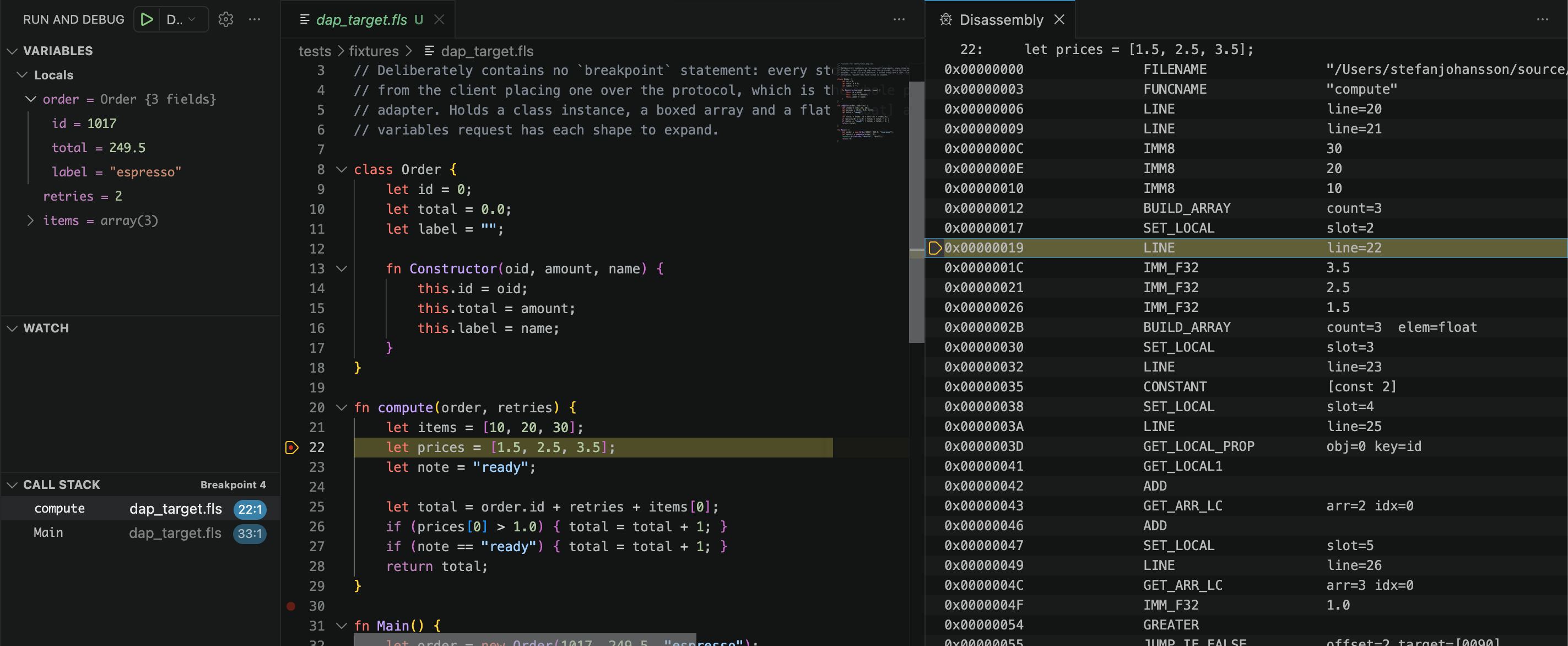
Set breakpoints in VS Code and step through Flaris source with locals, object fields and array
elements in the Variables pane. The VM speaks the Debug Adapter Protocol itself
— there is no separate adapter process to install. The same debugger is available as a
terminal prompt with --debug, so a session over SSH needs nothing but the VM.
Stopped at a breakpoint in compute: locals with the Order instance
expanded, the call stack, and the Disassembly View showing the bytecode for the same line.
🎯
Breakpoints & stepping
Gutter breakpoints, step in/over/out, and pause a running program. Breakpoints can be added or removed while it runs.
🧵
Every fiber is a thread
Fibers map exactly onto the editor's thread picker, so you can read any fiber's stack — and see what each one is waiting on.
🧩
Inspect anything
Locals, class instances, nested objects and arrays — including flat [float] arrays, read straight from their backing store.
💥
Post-mortem
An uncaught exception stops at the throw site with every frame intact, so you can read the values that caused it instead of guessing from a trace.
🔬
Down to the bytecode
The Disassembly View shows the instructions around any frame, and dis ir shows the typed IR a JIT-compiled function was built from.
🛡️
Read-only by design
Inspecting never allocates or changes a reference count, so attaching a debugger cannot perturb the behaviour you are trying to observe.
Debug from the editor, or from a terminal
# In VS Code: install the extension and press F5 on any .fls file.# From a terminal - stops at the start of Main:$ flarisvm --debug app.fls
# Serve the Debug Adapter Protocol on loopback for an editor:$ flarisvm --dap=4711 app.fls
Debugging turns the JIT off. A JIT-compiled function runs natively and never reports its source
lines, so a breakpoint inside one could not be reached — running everything in the VM is
what makes stopping reliable rather than silently skipped.
Standard Library
33 modules, zero dependencies
Everything from JSON and cryptography to regex, TLS streams and reflection is built in.
No import statement and no package manager required for the essentials — every module
below is always in scope. Ffi and Memory additionally require
--unsafe at runtime.
Data
Array
Buffer
Collections
Object
Class
Type
Strings & Text
String
Char
Regex
Json
Convert
Math & Crypto
Math
Random
Hash
Crypto
I/O & Files
File
Directory
Path
Stream
Console
FileWatch
Networking
Net
Concurrency
Fiber
Event
Scheduler
Timers
Weak
System
OS
VM
Ffi
Memory
Time & Debug
Time
Debug
TLS is not a separate module: Stream.ConnectTls and Stream.AcceptTls
return ordinary streams, so every Stream-based library runs unchanged over an encrypted socket.
HTTP clients and servers, compression, archives and 2D graphics are
add-on libraries written in Flaris, not builtins.
Libraries
59 add-on libraries, ready to import
Install a library once into your per-user libs folder — ~/.flaris/libs on macOS
and Linux, %USERPROFILE%\.flaris\libs on Windows — and import it by name from any
script, no --libs flag needed. Every one is open source under the MIT licence
and written in Flaris itself, so they double as a substantial worked example of the language.
# Run your first program$ flarisvm hello.fls
# Compile to bytecode, then execute$ flarisvm --compile hello.fls hello.flx
$ flarisvm --exec hello.flx
# Ship it as one self-contained binary$ flarisvm --embed hello.fls hello
Installs to ~/.flaris/bin/ by default. Override with FLARIS_HOME=/your/path.
Or download individual binaries below. On a Raspberry Pi 3, 4, 5, 400 or Zero 2 W, use 64-bit
Raspberry Pi OS: it runs the Linux ARM64 build, JIT included. flarisvm is the full toolchain (compiler +
runtime); flaris is the compiler-free runtime — around a third smaller and the base
for self-contained binaries. Note that flaris loads
only signed, trusted bytecode — see Signing.
If you want to run your own freshly compiled .flx, use flarisvm.
Embedding Flaris in your own application? libflaris is the same VM as a
linkable library — static and shared, with the headers staged alongside — and as a
WebAssembly module for JavaScript. See Embed the VM.
Editor support and the full documentation live under For Developers below.
Release
What's new
The headline changes in the current release. The changelog lists every new feature and
fixed bug, release by release.
1.0.6.02026-10-27
Added
Matrices.[[int]], [[float]], [[char]]
and [[bool]] are arrays of typed rows: m[i][j] runs compiled, and a
matrix takes only rows of exactly [T].
Sized-int casts narrow.(u8)x keeps the low 8 bits as
u8(x) does, and the signed forms sign-extend: (u8)300 is 44,
(i8)200 is −56. The same for 16 and 32 bits.
Objects and exceptions: an int or char key names its text, so
o[42] is o["42"]; an Exception subclass with its own
constructor passes code and message on with super(code, msg).
Tooling:flarisvm --disasm file.flx --list names the functions,
--disasm file.flx Point.len shows just one; in VS Code, a data breakpoint at an
address stops on every read or write of it.
Libraries:PgWire (PostgreSQL), Resp (Redis),
Mqtt and Modbus, all pure Flaris with no plugin and no
--unsafe; Tar and Tiff.
Changed & fixed
Nil flows through (breaking). Any arithmetic or bitwise operator with a
nil operand yields nil; ., [i] and a call on
nil yield nil through the whole chain, so ?. is gone; a
foreach over nil runs zero times. guard(x) raises where
nil is an error.
One spelling each (breaking).&& and ||
always yield a bool — use ?? for a fallback value; and/or
and the weak keyword are gone (Weak.Create); an interpolation hole is
one expression, with no alignment or format spec.
Parameters (breaking). An untyped parameter may be left out and arrives as
nil; a typed one is required, checked at compile time. A nil passed to
an int, float, char or bool parameter arrives
as its zero.
Only trusted bytecode is JIT-compiled: an unsigned .flx, or one
signed by a key not in trusted_keys, runs in the interpreter. Arrays hold up to
16,777,216 elements, Memory.Process spans 1 GiB per call; --fifo is gone.
A rewritten interpreter loop. Against 1.0.5.0, JIT off: fib −13%,
sieve −29%, collatz −5%.
The bytecode floor is now 1.0.6.0: a .flx built by an earlier version must be
recompiled. Opcodes no compiler emitted were removed and the rest renumbered; the set is now 187.
Read the full changelog →
Run it
One binary, the whole toolchain
Point the VM at a file and it runs — no project file, no build step, nothing to assemble
beforehand. The analyzer, the formatter, the debugger and the timing and memory reports are all
the same executable, so a machine with flarisvm on it has everything the language
needs.
Everyday commands
# Compile and run in one step - anything after the file goes to the script$ flarisvm app.fls data.csv --port=8080
# A one-liner, or a program piped in on stdin$ flarisvm --eval 'Console.WriteLine(Math.Sqrt(2));'$ cat app.fls | flarisvm -
# Analyze without running it, and format it$ flarisvm --check app.fls
$ flarisvm --format-write app.fls
# Where the time and the memory went$ flarisvm --time --mem app.fls
🔍
Mistakes before runtime
--check runs the full analyzer and exits without executing a line — type
errors, unreachable code, unused symbols and flow problems, plus a report of which functions
the JIT will take. -Werror makes warnings fatal and --diagnostics json
emits machine-readable output, so a CI gate needs no extra tool.
🧹
Formatting, built in
--format-write formats in place and --format-check exits non-zero
when a file is unformatted — a one-line CI gate. Nothing to install and no config file to
argue about; --indent, --width and --tabs are the whole
surface.
📈
Numbers on request
--time reports wall clock and idle time, --stats adds execution
counters, and --mem accounts for every object at shutdown — so a leak is a
number in a report rather than a slow crash in production. --disasm prints the
bytecode.
Or skip the compile at startup. Build once to portable .flx
bytecode and run that instead. The same file runs on every supported platform,
--strip drops the debug symbols from what you ship, and a corrupt or mismatched
file is refused on load rather than half-run. It is the same bytecode the single-binary and
embedded paths use.
Precompiled
$ flarisvm --compile app.fls app.flx --strip
Fingerprint(SHA256): [cd21bd4b3fcc...]

$ flarisvm --exec app.flx data.csv     # no compiler runs at startup
The debugger runs from here too — --debug for a
terminal prompt, --dap for VS Code. Libraries come from
flarispm, and every flag is in the
Language Guide. When a script becomes something you hand to other
people, fold it into a single executable; when it belongs inside a
larger program, embed the VM.
Ship it
Self-contained binaries
Like Go, Flaris can fold your program and the runtime into a single native
executable — one file to copy, nothing to install on the target machine. The full
toolchain compiles your .fls, then appends the bytecode to the small
flaris runtime stub. The result is an ordinary executable that runs your program
when launched.
One command from source to binary
# Source in, self-contained executable out$ flarisvm --embed app.fls myapp
$ ./myapp arg1 arg2 # runs standalone - no flaris on PATH, no --libs# Statically link every library the program imports$ flarisvm --embed app.fls myapp --bundle
# ...or name the exact files yourself$ flarisvm --embed app.fls myapp --bundle='./mylib.flx'
# Already have bytecode? Embed the .flx directly$ flarisvm --embed app.flx myapp
How it works. The program is appended to the runtime after its native image,
with a small trailer recording where the payload begins. On startup the binary reads that trailer
out of its own file and runs the embedded program — falling back to a normal VM only when no
payload is present. Because the payload rides after the executable image, the OS loader
ignores it, so a plain copy of the file still works.
Bundling. Pass --bundle and the compiler follows your
import statements — and the imports those libraries make in turn —
then links exactly that set into the payload. The shipped binary needs no
~/.flaris/libs and no --libs, and carries only the libraries it
actually uses. To pick the set by hand, name the files instead:
--bundle='./mylib.flx'.
The stub is the runtime only (no compiler, no eval), so you ship exactly the bytecode
you built, with a smaller attack surface. A modest program lands around 1 MB total.
Self-contained binaries run on Linux, macOS (including Apple Silicon), and Windows — the payload
rides in space every executable format already tolerates. Producing binaries that pass strict
code-signing (macOS notarization, Windows Authenticode) is on the roadmap.
Embed the VM
Scripting for your application
The other direction: link libflaris into your own program and Flaris becomes its
scripting layer — the way Lua is embedded. Start a host, load a script or a precompiled
.flx into it, and call its functions from C.
It is the same VM the CLI runs, minus the command-line front end.
Cheap enough to use per request. Starting a host, loading a script,
calling into it and tearing it down costs tens of microseconds, so isolation does not have
to be rationed: give every plugin, tenant or request a host of its own — its own
globals, capabilities and limits — and destroy it when the work is done. A script that
fails hands your code an error value instead of ending your process.
host.c
#include "flaris.h"#include <stdio.h>int main(void)
{
/* one VM, owned by this thread */
FlarisHost *host;
FlarisHostCreate(NULL, &host);
FlarisHostLoadScript(host,
"fn Greet(who: string): string {\n"" return \"hello, \" + who;\n""}\n", "<host>");
/* resolve once, call as often as you like */
FlarisFunction *greet = FlarisHostGetFunction(host, "Greet");
FlarisValue args[1] = { FlarisString("world") };
FlarisValue result;
char err[256];
if (FlarisFunctionCall(greet, args, 1, &result, err, sizeof err) == FLARIS_OK)
printf("%s\n", FlarisAsString(result, NULL));
FlarisReleaseValue(result);
FlarisReleaseValue(args[0]);
FlarisHostDestroy(host);
return0;
}
Build and run
# macOS ARM64$ cc host.c flaris-lib/lib/libflaris.a -Iflaris-lib/include -o host \
-lm -framework Security -framework CoreFoundation
# Linux x86_64 / ARM64$ cc host.c flaris-lib/lib/libflaris.a -Iflaris-lib/include -o host \
-lm -ldl -lpthread
# Windows x64 (MSYS2 clang64)$ cc host.c flaris-lib/lib/libflaris.a -Iflaris-lib/include -o host \
-lws2_32 -lbcrypt -liphlpapi -lsecur32 -lcrypt32
$ ./host
hello, world
One header, one library. Every archive unpacks to the same shape.
flaris.h is self-contained — it includes nothing but
<stddef.h> and <stdint.h>, and declares the whole API in
terms of C types and FlarisValue. Writing a C plugin that Flaris calls into
is the other direction and uses ffi_object.h instead;
embedding the VM does not need it.
flaris-lib/
include/
  flaris.h        # the embedding API - the only header, self-contained
lib/
  libflaris.a     # static: macOS, Linux, Windows
  libflaris.dylib # shared: macOS (libflaris.so on Linux; flaris.dll + libflaris.dll.a on Windows)
Static or shared, your call. The static library is the simplest thing that
works — one archive, no runtime dependency to ship. The shared library exports exactly the
API above and nothing else, so the VM's internals can never become something you accidentally
depend on. Ship the library next to your executable and link it with an rpath so it is found
there; on Windows, link the import library and define FLARIS_DLL so the
declarations become dllimport:
Linking the shared library
# macOS - the rpath is what lets the exe find the dylib beside it$ cc host.c flaris-lib/lib/libflaris.dylib -Iflaris-lib/include \
-Wl,-rpath,@executable_path -o host
# Linux - same idea, $ORIGIN is the directory holding the exe$ cc host.c flaris-lib/lib/libflaris.so -Iflaris-lib/include \
-Wl,-rpath,'$ORIGIN' -o host
# Windows - link the import library, no rpath concept$ cc host.c -DFLARIS_DLL flaris-lib/lib/libflaris.dll.a -Iflaris-lib/include -o host
Ship bytecode, not source. Compile your scripts to .flx as part of
your build and load those instead — nothing to parse at startup, no script source in the
shipped product, and a corrupt or mismatched file is refused on load rather than half-run.
Bytecode is portable, so one .flx runs on every platform your application does.
Your loop stays yours. A call runs on your thread and returns when the
script function does — there is no scheduler to drive and nothing runs behind your back
between calls. Resolve a function once with FlarisHostGetFunction and call it
every frame. A function that waits — an await, a sleep — is abandoned
and reported as suspended rather than blocking you.
Errors are values, and nothing kills your process. A script that throws does not
print and vanish: the call returns FLARIS_ERR_RAISED and hands you the exception's
code and message, and the VM stays usable afterwards. That holds for any failure inside the call
— a division by zero or an unhandled runtime error included. The library never calls
exit().
The host stays in charge. Signal handlers, worker threads, the JIT,
capabilities, the stack and fiber limits and the module search path are all yours to set
at startup — and an out-of-range value is refused rather than quietly clamped. Give
the host an output handler and everything goes there instead of stdout and
stderr — what the script prints and every diagnostic the VM produces — so an
embedded VM never scribbles on a console you did not want it to touch.
From JavaScript, too. The same VM ships as a WebAssembly ES module for
browsers, web workers and Node — flaris-lib-wasm.zip in
Downloads, one archive for every platform. Arguments and results
cross as ordinary JavaScript values, a script calls the JavaScript functions you register as a
module, and an exception the script throws reaches you as a FlarisError. There is
no JIT in WebAssembly, so it interprets. The API is section 15 of
doc/embedding.md.
Static and shared libraries for every supported platform are in
Downloads. Integration is one header and a library:
flaris.h is self-contained, declaring the whole API in terms of C types and
FlarisValue, a one-word opaque handle. The full guide —
lifecycle, configuration, loading bytecode, value ownership, native modules and threads
— is in doc/embedding.md. Every thread can create a host
of its own, so an application can run one VM per thread; the scripts loaded
into a host share its one global scope, and every call into a host must come from the thread
that created it.
Security
Every release is signed
Flaris bytecode (.flx) carries an embedded Ed25519 signature.
The official standard library is signed with the Flaris signing key, and the matching
public key is compiled into the runtime as a trust anchor - so signed code verifies with
nothing to download or configure. A tampered .flx always fails to load.
How strictly unsigned code is treated depends on which binary you run.
flarisvm, the full toolchain, is permissive by default so you can run code you
just compiled: it warns about unsigned bytecode but executes it. Pass
--require-signed to refuse anything not signed by a trusted key. Its trust store
is per-user at ~/.flaris/trusted_keys, and you extend it with
--import-key.
flaris, the compiler-free runtime, is built for locked-down deployment: the
requirement is compiled in and cannot be switched off. It loads only
bytecode signed by a trusted key. Its trust store is the system-managed
/etc/flaris/trusted_keys (%SystemDrive%\ProgramData\Flaris\trusted_keys
on Windows), read with no environment input so that whoever launches the process cannot
redirect it — which also means --import-key is unavailable there and the
file must be added by root. Official releases need no setup at all: they are signed with the
key below, which is already a built-in anchor.
This is the canonical reference. Confirm your install matches it: the key shown when you
inspect a library, the key compiled into your runtime, and the value above should all be
identical. If they agree, the artifact was signed by the official Flaris key.
Verify a library
# Inspect any .flx - the signer and trust status are in the header$ flarisvm --disasm ~/.flaris/libs/Jwt.flx
Signature : Ed25519 (valid, trusted signer)
Signer : flaris-lang.org
Signed by : d43ec4260fe82ee101a939caabff95358b0698718d7b8c38652b5457bdf59621
# Machine-readable status: unsigned | signed|trusted|<key>|<signer>$ flarisvm --sig-info ~/.flaris/libs/Jwt.flx
# Full toolchain: opt in to strict checking$ flarisvm --require-signed --exec app.flx
# Runtime: strict always, no flag needed and none accepted$ flaris --exec app.flx
Package is unsigned
This runtime loads only trusted bytecode: sign it with a trusted key,
or add the signer to /etc/flaris/trusted_keys as root.
valid, trusted signer means the embedded key matched a trusted key;
valid, untrusted signer means the signature is good but the key is not trusted
(trust a third-party publisher by adding the key to ~/.flaris/trusted_keys for
flarisvm, or to /etc/flaris/trusted_keys as root for
flaris); INVALID means the file was altered after signing.
Found a security problem? Report it privately, not in a public issue — the
security policy says how,
and what to expect: an acknowledgement within 7 days, and coordinated disclosure after a fix
or 90 days.
Package Manager
Extend Flaris with flarispm
flarispm is the official Flaris package manager - written entirely in Flaris itself.
Install libraries from any public or private git repository, or straight from a signed
.flx URL, in one command. No central registry. No build system. Packages land in
~/.flaris/libs, which the runtime already searches.
The one-line installer above already puts flarispm on your PATH, so there is nothing
further to set up. It ships as a single signed.flx, and
flarisvm verifies its flaris-lang.org signature on every run - so you can
trust it regardless of how it reached you. Downloaded on its own, run it as
flarisvm --exec flarispm.flx.
Setup
# Already installed by install.sh / install.ps1 - check it is there$ flarispm version
flarispm 0.5.0
# Grabbed the .flx on its own? Verify it, then run it directly.$ flarisvm --sig-info flarispm.flx
signed|trusted|b6e2…79be|flaris-lang.org
$ flarisvm --exec flarispm.flx version
Install and use a package
# Initialise a project manifest$ flarispm init
# Add any package from GitHub (or any git host)$ flarispm add https://github.com/stefansolid/flaris-test-package
# ...or a pre-compiled .flx straight from a URL$ flarispm add https://www.flaris-lang.org/libs/Argparse.flx
# Packages install to ~/.flaris/libs, which flarisvm already searches -# no --libs flag needed. Set $FLARIS_LIBS to install somewhere else.$ flarisvm myapp.fls
# Commit flaris.json AND flarispm.lock; anyone who clones the project# then reproduces your exact build - same commits, same bytes.$ flarispm install
# Confirm nothing drifted (exits non-zero if it did - good in CI)$ flarispm verify
Clone, compile and register a package - or download a .flx
flarispm add <url> --key <pk>
Require a signed .flx from exactly this Ed25519 publisher key
flarispm install
Reproduce every dependency in flaris.json, verifying its pin
flarispm remove <url>
Remove a package and its compiled files
flarispm list
Show installed packages and their status
flarispm update [url]
Fetch the latest and move the lock (all packages, or one)
flarispm verify
Check the installed files against the lock; exits non-zero on drift
flarispm prune
Remove packages nothing depends on any more
flarispm version
Print flarispm version
Two files, and you commit both. flaris.json is yours: it says what you
asked for — a branch, a tag, a URL. flarispm.lock is generated: it
says what actually resolved — the exact commit, the source and byte hashes, the
publisher's Ed25519 key, and which module files each package owns.
That split is what makes a build reproducible. "main" names different code next
week; a commit does not. flarispm install checks out the recorded commit even after
the branch has moved on, verifies every pin before anything reaches the import path, and never
re-pins — only add and update do. Dependencies a package declares
for itself are installed too, in dependency order, and two packages claiming the same module
filename is a refusal rather than a silent overwrite.
For Developers
Learn everything
Editor tooling and the full documentation - language specification, standard library reference, and FFI guide - all maintained alongside the source.
VS Code Extension
Syntax highlighting, inline analyzer errors, build/run tasks, and the debugger - breakpoints, stepping and variable inspection. Search for Flaris in the Extensions pane, or install from a terminal with code --install-extension flaris-lang.flaris.
Link libflaris into your own application: load a script or a precompiled .flx, call its functions from C, pass values across the boundary, and drive the scheduler from your own loop. The opposite direction to the FFI guide.
The complete .flx ISA manual: container format, Ed25519 signing, string pool, all 187 opcodes with stack effects and traps, loader validation rules, and an annotated hex dump. Self-contained - everything needed to write your own compiler, VM or tooling, with a companion format diagram.
Bug reports, feature requests, collaborations, and questions are all welcome.
For questions and general chat, the Discord server is the fastest way to reach us.
For bug reports, please include the Flaris version and a minimal reproducing script.
Commercial
Commercial use
FlarisVM is free to use and redistribute, including in commercial products.
There are no per-developer, per-device, or runtime royalties.
For organizations that require additional assurance or long-term commitments,
commercial services are available:
Technical evaluation & integrationfrom €3,000
Commercial supportfrom €2,500/year
Long-term maintenance (LTS)from €5,000/year
Source escrow & source accessby agreement
Sponsored development
Platform support, integrations and runtime features
Flaris is currently looking for its first production integrations.
Early-adopter arrangements are flexible, with a focus on validating Flaris against
real embedded and edge workloads.
You don't need a commercial agreement to ship FlarisVM. Commercial services are for
organizations that need support, continuity, source access, or dedicated engineering.